Mozilla Foundation has launched its new password manager app called Lockbox on the Google Play Store. The application works on Android 7, 8, 9 operating systems, and it is ad/in-app purchase free. Its size is 43 megabytes. Is the new password manager app worth using? What features does it provide to the users? Is it secure? Let’s find it out!
LockBox requires three permissions to work – auto start, network access, and see network connections. To use it, you must have a Firefox account. You should also be a user of the Firefox mobile or desktop browser.
Firefox Lockbox review
While creating a Firefox account, the app prompts users to enter their age and password. They’re also asked to verify their email address. Once the account is verified, users should tap the continue button displayed in the application to get started with Firefox Lockbox.
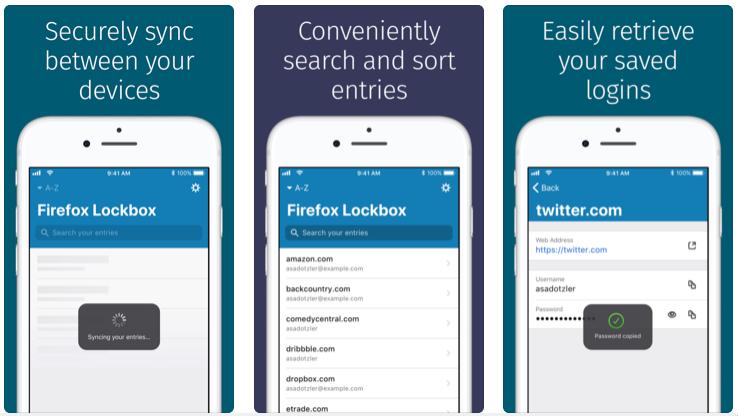
Once you log in, you’ll see a list of login credentials for various websites. LockBox enables users to sort this list alphabetically and by the usage of passwords. It also enables you to search for passwords by account name. Users are not allowed to group passwords in Lockbox or export the login credentials to a file.
How is the list generated?
Lockbox syncs your entries automatically every time you log in to the application. It doesn’t have the option to disable automatic syncing of passwords. LB doesn’t let users sync their login data manually. To sync passwords from desktop to the app, you must log in to your Firefox account on Firefox Android/IOS or desktop browser. Firefox can autofill the text fields displayed on websites. To enable this feature, you must provide Lockbox permission to auto-fill forms.
Settings
Lockbox can automatically lock itself after N minutes. The option to enable the auto-lock feature is in the app’s settings interface. Users can completely disable the auto-lock or auto-refill feature. Lockbox sends usage reports to the Mozilla servers by default. You can disable this feature from the settings UI.
Must see: Best Windows 10 apps
Security
When it comes to security, LockBox is a sophisticated product. According to Mozilla, the app employs AES 256 bit block cipher algorithm, Onepw protocol, and PBKDF2/HKDF key derivation functions to save/retrieve passwords. Firefox lets users unlock the app with their fingers or face. You can enable this feature during the setup process. If you want to use a passcode, tap the “Skip For Now” option. The app also prevents users from taking screenshots of its interface.
Pros
UI: The app’s user interface is beautiful.
No advertisements: Mozilla LB doesn’t have in-app purchases or ads.
Cons
Wastes time: Users must enable the syncing feature on the Firefox desktop. They are also asked to create a Firefox account. Another downside of Lockbox is that it doesn’t allow you to save the password manually. Also, users cannot edit, generate, or delete the password with this application. The app allows you to see and use the passwords you have saved with the Firefox browser.
Internet connectivity issues: FF Lockbox sometimes fails to connect to the internet even when mobile data/WiFi connection is active on the phone.
Should you switch from KeePass, Dashlane, or LastPass to Firefox Lockbox?
I am a Keepass user. I tried Mozilla LB for a few hours. I didn’t find any good reason to use it.
Final thoughts
Firefox Lockbox is a tool that lets users manage the passwords they’ve saved with Firefox desktop or mobile app. Lockbox is a great app for users who use products launched by the Mozilla foundation. If you’re not a big fan of the Firefox browser, you should stay away from Lockbox and use one of these Android password manager apps.
Although FF encrypts the password saved on the PC, the current logic of using the Firefox browser as a password manager is bad. Mozilla should launch a dedicated application for managing the website login data on mobile devices and desktops.