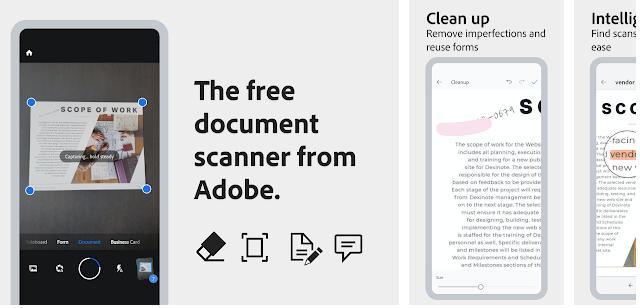
Adobe had launched the Scan application in 2017. 10+ million users are currently using the app. Scan’s average rating is 4.7 on the Google Play Store and 4.9 on iTunes. Does the Adobe Scan app work as advertised? Can it recognize the text you’ve written? Can it identify the text printed on the pages of a book? Here’s our unbiased review of the latest Adobe application.
Adobe Scan app review
Getting Started
Adobe Scan displays a full-screen dialog that shows buttons to log in with Google/Facebook account and a link through which you can log in to the app with your Adobe account or register a new Adobe account. The dialog also displays a cancel icon to close the login screen. You should not tap the cancel/close icon because of the following two reasons:
- The dialog will be displayed each time you run the app. It won’t be displayed when you sign in with Facebook, Google account, or your Adobe Id.
- You can scan only one card, page, etc without logging in.
When you log in, Adobe Scan will display its camera interface that flaunts:
- The four scanning modes – whiteboard, form, document, business card.
- A shutter and a gallery icon.
- An option to disable the auto-capture feature.
- An option to turn the phone’s flash on or off.
Note: If you had used the scanner before logging in, the app would automatically sync the images to Adobe cloud once you sign in.
The Adobe app can correctly scan whiteboards, forms, documents, and business cards. You can also capture the pages of books, magazines, etc with it. Adobe Scan can turn on the flash when the light in your room is low. The application automatically recognizes the document’s/business card’s width/height and copies the content printed on it on an image.
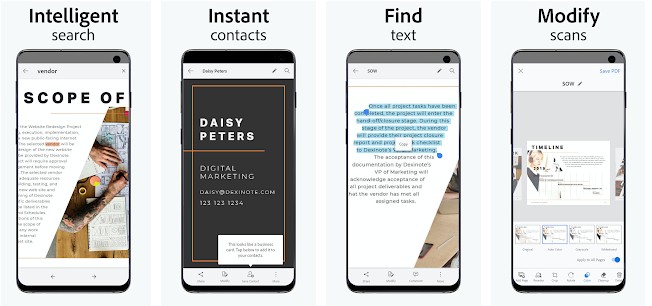
What happens when you tap the shutter icon/button? The application displays a thumbnail of the image you’ve taken to the right of its shutter button. You can save this image as a PDF file.
Features
Adobe Scan shows the following options when you tap on an image:
Reorder: If you’ve scanned several pages of a book, you’ll find this utility helpful. The re-order tool displays images and numbers below them. You must tap the image and drag it to change its position.
Crop: The application detects the edges of a paper accurately. If you think a small part of the paper shouldn’t be there on the picture, use the Crop tool.
Color: Adobe Scan can automatically correct the color of an image or all the photos it has saved on your mobile device. With this application, you can also apply grayscale or whiteboard color effects to the pictures.
Cleanup: If the book or card you’re scanning is dirty or has patches of dirt, you can use the application’s “Cleanup” tool to remove the stains from the image.
Search and filter: This tool enables you to find files by their name or text content. It can find files having printed text. Once you tap a file displayed in the search results, Adobe Scan will open the file and highlight the search phrase. If the tool shows several documents as search results, you can filter the results by type, date, etc.
Links to the image: Adobe Scan can generate a shareable link to the photos stored on Adobe Document Cloud.
Settings
Adobe Scan lets you change its theme from light to dark from its settings interface. This interface also allows you to block the app from using cellular data or prevent it from running the text recognition function on the saved PDFs. The application supports 19 languages i.e, it can recognize the text written in 19 different languages. By default, Adobe Scan saves the files to a folder it has created. You can configure it to save the images to the phone’s gallery.
Pros
Powerful OCR: Adobe’s app has one of the best OCR utilities in the world. The image it creates after scanning a document looks exactly like the document (or better if you use the filters).
Free and secure: Scan is a free tool. It saves your documents to the secure Adobe cloud platform and provides an option to disable OCR.
Cons
Text extraction: The application from Adobe can create PDF and image files only. The Scan app doesn’t let you copy the text it has recognized or save the full text of a scanned doc to a text file or files of other formats.
Requirements
Adobe Scan requires 78 megabytes of storage memory on Android devices and 132 MB on an iOS device. As it saves files to the storage memory, you’ll be prompted to enable the “Storage Access” permission.
Alternatives
CamScanner is a popular application, but it was removed last year from the Play Store for a brief time after Google engineers found malicious code in one of the libraries it used. TinyScanner has an excellent rating, but it is a paid app.