Unlike computers, smartphones have limited storage capacity. If your mobile device has an SD card slot, you can quickly expand the storage memory of your device. But, if the handset doesn’t have a MicroSD slot, you must remove useless files from the phone with an Android cleaner app.
Although you can move important files to the cloud storage platform, this method requires you to enable data connection on your phone. High-speed data plans are costly. One of the best ways to free up space on a mobile phone without spending a dime is to create zip, rar, .z, tar, gz, tar.gz format archives with the best file compression app. I’ve already covered the best cloud storage apps on this site. Below, I’ve shared the best apps to compress or extract files on the mobile phone.
5 best file compressor for Android
WinRar
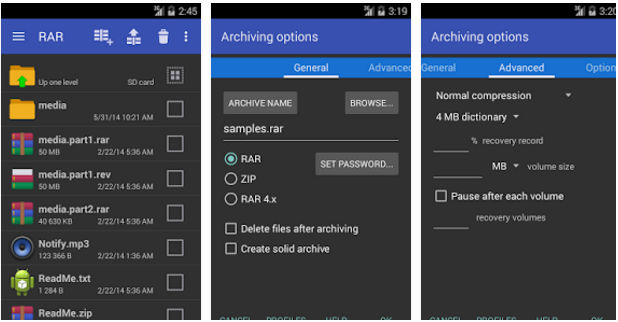
WinRar is the most popular desktop and mobile app for compressing files and folders. It is an easy-to-use application that employs a robust algorithm for compressing large and small files. WinRar displays a list of folders and files in its dark/blue interface. It flaunts the “archive files” option at the top of the list. To create a RAR/ZIP archive, you must select files from the list.
WinRar provides an option to bulk select and compress files. It enables you to test and benchmark archives. It allows you to see the list of files and folders in a directory and the space occupied by them. WR also enables you to change the order of the files. It lets users share archives with their friends. You can configure WR to show hidden files, thumbnails, etc. The Android file compressor app, WinRar, maintains a list of archives you’ve recently created. It is a tiny app that occupies 10 megabytes of storage space.
ZArchiver
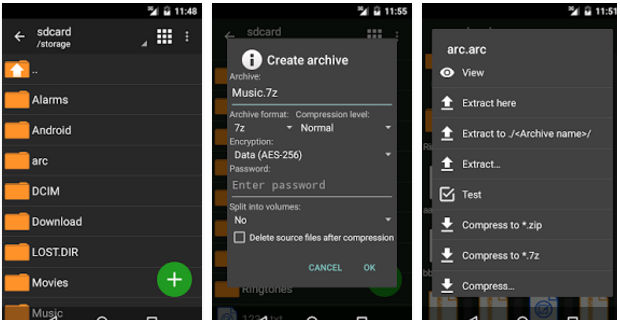
ZArchiver is a powerful file compression app for Android smartphones and tablets. It has a dark color interface like WinRar and plenty of options. ZA allows users to find files by their names. It also includes an option to sort files by size, type, date, size, name, etc. It lets you create 7Z, Zip, and Tar archives. ZArchiver enables users to split large files into smaller chunks. It supports the following five compression levels:
- Fastest, fast, normal.
- Maximum, Ultra.
You can configure ZA to delete source files after compression. This application supports the multi-select mode wherein you can select files one by one. It supports the customization of the user interface. You can change the default compression levels/method, specify the character encoding, set the number of CPU cycles ZA should use, etc. The app can generate password-protected archives.
WinZip
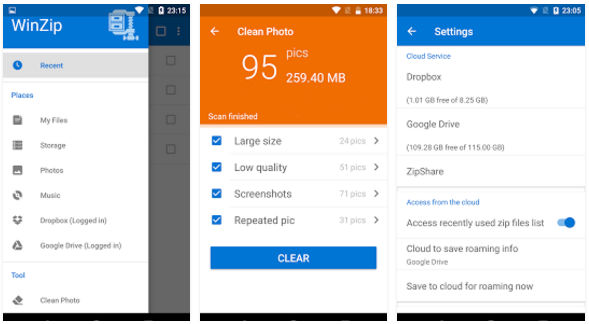
Like WinRar, WinZip is a popular app to compress files. WZ provides many features to premium users and essential features to free users. Android version of WinZip supports Chromebook. It can compress MP3 files to 15 or 20% of their original size with a lossless compression algorithm.
WinZip allows you to clean blurry, repeated, low quality, or large photos and free up space on the storage memory. It creates ZIP/ZIPX archives and extracts 7Z, CBZ, ZipX files. WinZip encrypts files with a 256 or 128-bit encryption algorithm. Once it finishes the task of extracting or compressing a file, WZ will display a notification. The app includes an option to turn off the push notifications. You can also email archive files to friends with it.
Also read: Best file manager apps for Android
7Zipper
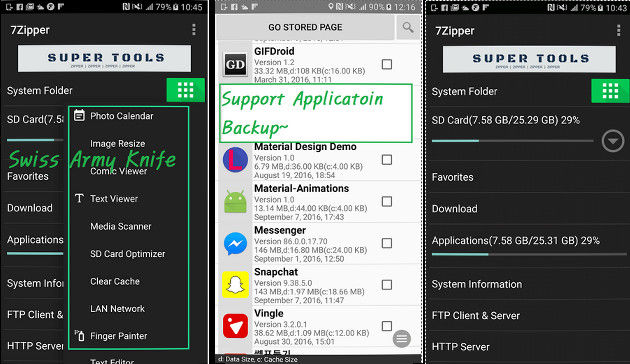
7Zipper is a file compression app that supports plugins. Apart from compressing or extracting archives, you can use 7Zipper to edit text files, kill tasks, transfer files by installing plugins. 7Z allows you to find files containing specific words or text. It supports external storage devices connected to the phone via USB-OTG. The app enables users to copy, move, or select files in bulk. It has an inbuilt image viewer tool.
7Z includes an SD card analyzer tool that flaunts the list of folders and the storage memory used by them. The files are sorted by increasing order of their size. 7Z can generate a graph of storage memory utilization. You can see the hardware configuration of the phone with it. The app includes several features. If you want to use 7Zipper only for extracting or compressing files, you can configure 7Zpr to hide features you don’t want to use.
B1 Archiver
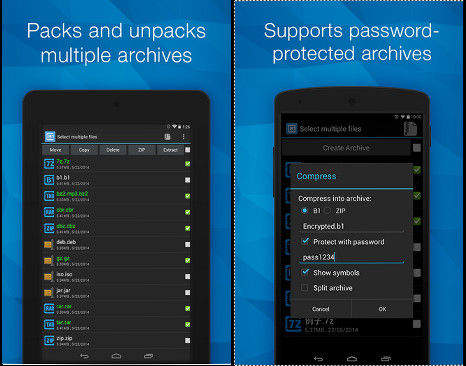
B1 Archiver is a popular file compressor app for Android devices. It allows you to create B1 and ZIP format archives on a mobile phone. You can set a password for the archives to prevent unauthorized users from accessing your files. If the file or folder is large, B1 can split the file and create a B1 or ZIP archive from the file. When you open this archive, B1A will merge the files it had split before creating the archive.
B1A enables you to create custom filters. It has the option to bookmark folders and sort files by last modified date, size, or name. Like other apps I’ve covered in this article, B1A lets you work with hidden files. You can also move the files B1A has compressed to a folder of your choice.
Also check: Best password manager apps for Android
Final thoughts: If your phone is running low on storage, use one of the five best file compressor apps I’ve shared above to create highly compressed archives for free. Data compression is one of the most effective ways to save storage space on a mobile phone. When you require a file, you have to extract the archive (ZIP, RAR, etc file).